I've been busy
from USSEthernet@startrek.website to selfhosted@lemmy.world on 31 Mar 2026 04:44
https://startrek.website/post/37552747
from USSEthernet@startrek.website to selfhosted@lemmy.world on 31 Mar 2026 04:44
https://startrek.website/post/37552747
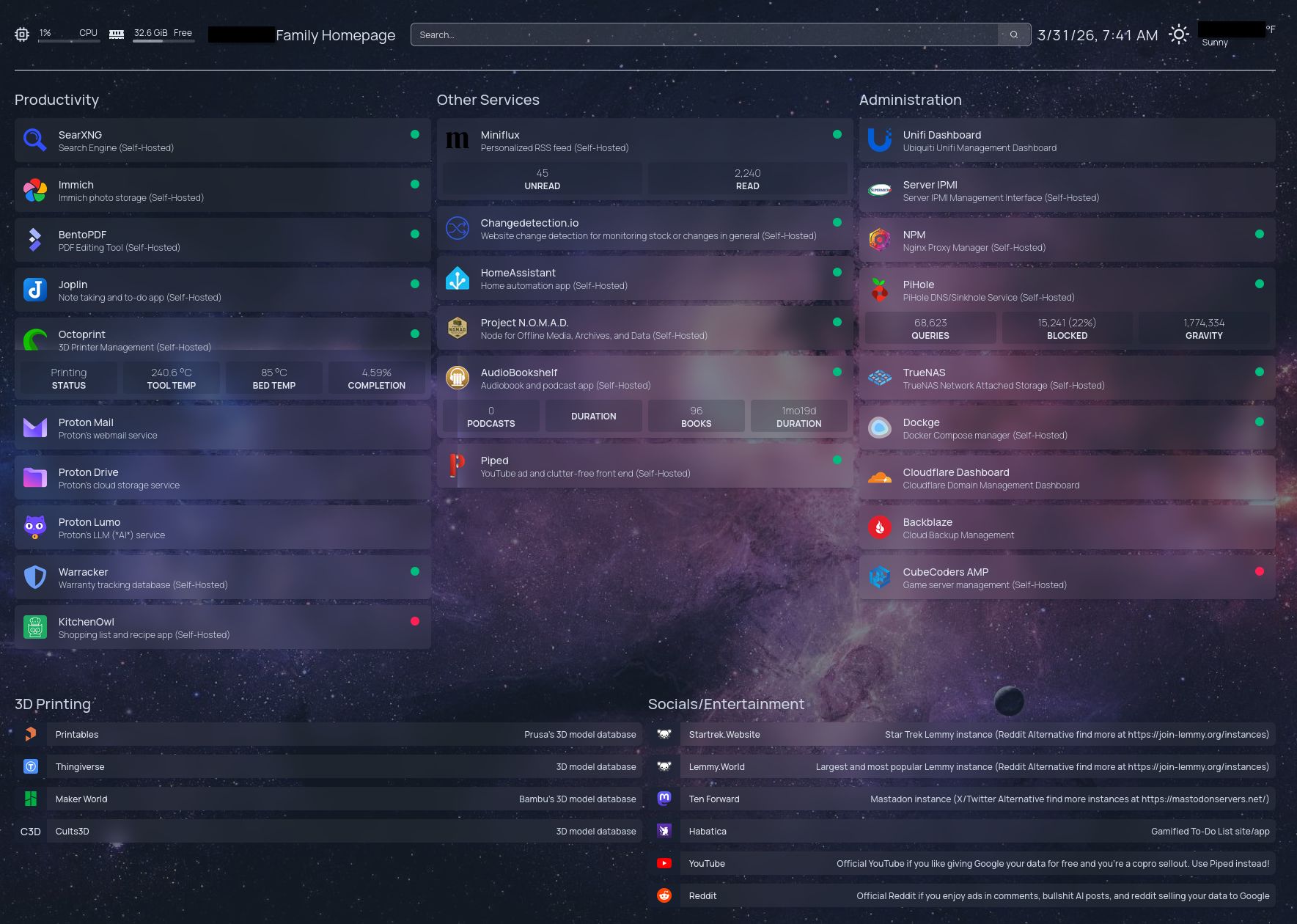
Any recommendations for my Homepage setup or services to add/replace?
threaded - newest
How are your backups doing?
I only backup specific folders in my NAS and some of my service DBs. I have test restored some files from Backblaze without issue. With Backblaze you pay for pulls, so I only chose to restore some small files to test restoral. TrueNAS encrypts the data before it goes to Backblaze and then Backblaze also encrypts the data in the buckets on their end, so double encrypted. I don’t have another on site copy so not really following the 3,2,1 rule. I figure RAID and an off-site backup is enough for me.
I’m in the early stages of figuring out self hosting. This is beautiful
Looks great OP! If I hadn’t chose Homar long ago, it would definetly be the one I’d use. Homarr will do some metrics like Homepage. What kind of 3d printer do you have?
I have a Prusa Core One+ that I just got and built recently, don’t have anything for it on the homepage. Then the Octoprint is on a Pi 3B plugged into my Prusa MK3S+. I’ve been trying to sell the MK3S+ because I don’t have room for them both, but not getting any takers.
That’s a nice one. I was gifted a Raise3D Pro2 Plus. It is very useful around the farm.
Acronyms, initialisms, abbreviations, contractions, and other phrases which expand to something larger, that I’ve seen in this thread:
6 acronyms in this thread; the most compressed thread commented on today has 14 acronyms.
[Thread #202 for this comm, first seen 31st Mar 2026, 12:30] [FAQ] [Full list] [Contact] [Source code]
I’m always at awe when people do this for their home like I’ve been managing infra for almost two decades and don’t have even quarter of the things some people install and manage. It looks overwhelming to be honest.
I’ve been managing infrastructure for over 3 decades and I don’t have this.
I have something like homegrown pihole (dnsmasq with block lists) , jellyfin, qbittorrent and nfs/smb share. Everytime when such a post appears there is this irrational desire to create cool monitoring and homepage and homeassistant. Never materialises into anything, after all there is always emacs that requires tinkering if needed. :3
I can recommend Heimdall as a quick scratch for that itch. Not big on monitoring, but a great landing page for almost no effort.
Get crackin’. LOL For me, it’s a toss up between Homarr & Homepage. I went with Homarr which can do some of the metrics like Homepage, but Homepage has all the candy.
A lot of professional chefs I know, when at home, either don’t cook much or eat garbage. Might the same principle haha.
If it’s your job, it’s probably the last thing you want to do when you’re off the clock.
That’s pretty sick, kudos!
1% CPU usages, 50% RAM usage. That checks out.
I’m guessing that a good chunk of that usage is coming from the TrueNAS VM.
Correct, most of that is ZFS cache. All of my containers are barely using 2-3GB.
I have similar stats on my server. I have ~40 containers running (some are duplicate because I am to lazy to combine all PSQL servers). And since I am the only user, most of them are idle for a lot of the time.
<img alt="" src="https://lemmy.world/pictrs/image/049b9db6-8550-49fb-be9b-fde608fd7405.png">
Could you point to how you get something like this started?
I run Home Assistant on a RPi4 but have a capable computer I would love to use for self hosting, especially immich.
Look up some youtube videos on self hosting. For Immich I just mostly followed their guide on their site. Really depends on what you want to do and how you want to do it.
I was talking about how you have everything organized, it looks great.
gethomepage.dev
Look into docker containers in general. If I was going to start from scratch in your position this is what I’d do:
Install a Linux distribution on the computer you plan to use for self hosting. I found Debian with the KDE plasma desktop environment to be pretty familiar coming from Windows. You could technically do most of this on Windows but imo self hosting is pretty much the only thing that a casual user would find better supported through Linux than Windows. The tools are made for people who want to do things themselves and those kinds of people tend to use Linux.
Once you have a Linux distribution installed, get docker set up. Once docker is set up, install portainer as your first docker container. The steps above require some command line work, which may or may not be intimidating for you, but once you have portainer functional you will have a GUI for docker that is easier to use than CLI for most people.
From this point you can find the docker installation instructions for any service you want to run. Docker containers have all the required dependencies of a given service packaged together nicely so deploying new services is super easy once you get the hang of it. You basically just have to define where the container should store it’s data and what web port you want to access the service on. The rest is preconfigured for you by the people who created the container.
There’s certainly more to be said on this topic, some of which you would likely want to look into before you deploy something your whole family will be using (storage setup and backup capability, virtual machines to segregate services, remote accessibility, security, etc). However, the above is really all you need to get to the point where you can deploy pretty much anything you’d like on your local network. The rest is more about best practices and saving yourself headaches when something breaks than it is about functionality.
Dont do this. OP built a security nightmare
How so?
Docker will happily download malicious containers. It doesn’t use cryptography to verify what it downloads during the layer pull.
That’s overly dramatic phrasing and you know it. Adding this kind of hyper technical quip to a thread aimed at beginners is insane. Stop doing that.
No. Just use apt. Don’t fill your house with sensors that make you vulnerable
Linux can do that too from miners, backdoors/SSH credential stealers, bots, rare ransomware but they exist, rootkits, spyware, and supply‑chain attacks
Apt has done sig checking since 2002 iirc
The Homepage wiki is pretty detailed.
This is such a good way of organizing services. Thanks!
Yeah, Homepage is great.
The most difficult part of homepage is trying to search if someone else has difficulties/ideas with it, outside of its github issues.
100%, trying to get my local icons to show up was a pain in the ass, turned out to be a permissions issue on the storage. I didn’t want homepage reaching out to the web for icons.
It is. I’ve tested a couple other solutions but I’ve been staying with homepage for a while now. I am satisfied.
I honestly don’t understand the need for bentopdf. Why is hosting PDF manipulation useful?
You basically get all of the things an adobe subscription would get you for free? Also, I’m on Linux so no Adobe anyway. It all runs in the browser so no need to install software.
Yeah, I see the tooling and it seems nice. I’ve always used the CLI tools and scripts I’ve built over the years to get this done, but having unified functions in one place is great.
I just don’t understand the hosting part… Is there an advantage to having it hosted rather than in a local appimage or flatpak? Maybe I’m misunderstanding the premise…
Well the dev built it to run in a container image. You’d have to ask them why that was their choice instead of making an app that can be installed. The dev is on Lemmy, they’ve posted before. Shoot them a message.
Fair enough, thanks for taking the time.
How does Bento compare to local tools such as PDFSam?
Very nice. This brings back memories of when I fled around with homepage. This would be about what I’d see if I kept it up. Kudos!
How do you find dockge over portainer? I tried it but it uses more resources and i couldn’t individually start/stop apps in a stack. It was all or nothing.
I only recently started using it, honestly couldn’t say. I’ve never used portainer. I just started using dockge because that’s what the guide I was following for the arr stack was using. Still haven’t finished the arr stack setup yet. I did stand up changedetection with dockge though because trying to set it up in TrueNAS was a pain in the ass when trying to get it to play with playwright correctly.
I’ve used it briefly, and then went back to Portainer. I had no real complaints about dockge, other than I could drive the Portainer bus more efficiently and it just seemed to fit my flow. There are quite a few here that use dockge tho, so it must be a capable app.
That looks awesome.
I want to set up something like this as well, I just don’t have that much free time
Any recommendations on getting music and podcasts? I’d like to self host my current Spotify list to dump that service too
If by “getting” music you mean “self-host stuff you already own”: Navidrome is an obvious choice, with Tempus for Android clients. It’s ridiculously low on resources, rich in features and quite pretty.
I meant more “How do I get the media”. I have a 7K songs spotify list which is the only reason I haven’t quit the horror show that is spotify; how would I find this music again outside of spotify?
I’m still not sure what it is you’re asking. If by “finding” you mean
If you have really never assembled a library of music you truly own, start now, and start small. Don’t let the large number Spotify gives you trick you into believing you need that. Realistically, you’re not listening to a fraction of the 7k songs it gives you all day every day. Focus on the albums/artists you really cannot live without, and once that is settled, branch out to the more exotic parts of your playlist.
What I meant is that I have a list of about 7000 songs on spotify that I have built over the years, I would like to have THAT list of music. If I go to a self hosted option, that is great, but without the media, worthless… I can download all the music that I want, but that will be a ginormous amount for a tiny amount of songs that I actually like. I’m already hosting a huge movie library, but I fear I might need hundreds of TB more storage to save all the music that I want :)
I guess I’m looking for a “download only these songs/albums/bands from this spotify list” type thing
Music isn’t expensive to self-host; 1 min of music cost you roughly 1MB of space, which means your playlist of 7k tracks (assumed average length: 5 mins) clocks in at around 35 GB of storage space. So just start collecting.
As for your other request. I’m not too familiar with Spotify, but a net search yielded this. I cannot speak to the legality if any of the solutions recommended there, and if they still work (the thread is 2 years old).
can you share the config?
Nice setup! I particularly like the kitchenowl deployment - it’s such an amazing tool and relatively unknown.
One suggestion: the title header says “Family homepage”, yet the page contains admin tools that none other than you will ever use. I noticed that all this “admin clutter” was so off-putting that it kept others from actually using the dashboard. I’ve therefore created another homepage instance that showcases user-facing services only. It makes the UI much cleaner - and users more likely to actually find the services they may be looking for.
Ooooo good idea. Maybe I’ll do that. The categories are collapsible too so I had put admin tools 3rd so on mobile you’d have to scroll passed the rest of it to see admin. Thanks for the suggestion.
Just speak to me like I’m a dumb person, but what the hell is the point of hosting proton stuff? I’m a proton user and never once has this thought ever crossed my mind. What am I missing out on?
I’m not hosting Proton, these are just links on my homepage. Things I’m hosting have the dots next to them or say (self-hosted) in the description.
I have been debating on making a home page out of my core service bookmarks. Have you explored many options? At one point I just considered making an HA dash