What are your opinions of using Pi-hole for DNS within a homelab environment?
from bernhoftbret@lemmy.world to selfhosted@lemmy.world on 16 Dec 2025 14:36
https://lemmy.world/post/40297584
from bernhoftbret@lemmy.world to selfhosted@lemmy.world on 16 Dec 2025 14:36
https://lemmy.world/post/40297584
I’ve run Pi-hole in my homelab for years and benefited from using the service. As well as the hands-on education.
With that said, what is everyone else’s experience with the software? Do you use Pi-hole in your homelab setup? I would assume many hundreds of thousands of people use Pi-hole.
Edit #1:
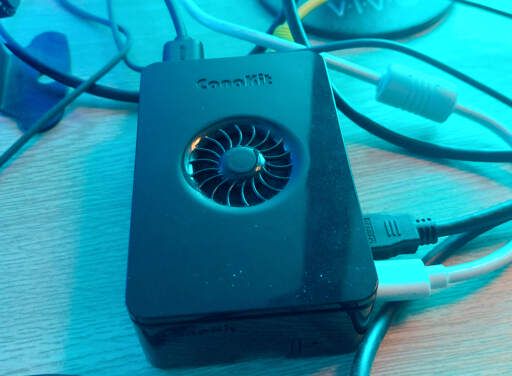
The image attached to this post is my RPi 5, which hosts the Pi-hole software. Big supporter of the whole “SBCs for learning and home improvement” mentality.
Edit #2:
It is interesting to see the broad support for Pi-hole and DNS blockers in general. The more options, the healthier the tech ecosystem is, which benefits everyone.
threaded - newest
I use Pi-Hole unbound, and I really like it. However, Technitium seems to be the new favorite and has a lot of bells and whistles that Pi-Hole doesn’t. I haven’t run Technitium basically because Pi-Hole fits my needs. If I were just starting out, I would probably consider Technitium.
I’ll have to check on this one, never heard of it, and unbound has a tendency to randomly fail on me after a few months.
I have Unbound configured on my pihole, it’s been running fine for years.
Huh…what do you do to revive it?
I’ve thought about switching to Technitium but dealing with network tools is a whole can of worms I don’t want to open up again until PiHole or Unbound shits the bed on me lmao. PiHole’s working just fine for what I need it to do.
Technitium is much easier to set up than pihole/adguard IMO, as it supports recursive resolving or DoH/DoT out of the box.
It also supports mirroring root servers, clustering etc. I switched last week and I’m very happy with it
Let sleeping dogs lie.
I am one of those zillion users. I love it.
I feel bad for households without a nerd to set up the family pihole
Like families where nobody cooks
You have never had some family member experience a broken website that they needed to work but you were not around to fix it on the server side?
That’s the reason I no longer have a pihole…
That’s why my wife is raw dogging the internet. I excluded her devices from Pihole after i heard too much “site x is not working”. She bought from some fake shops. I didn’t, thanks to our block list.
My 65 yo mother can disable and enable the 2 piholes on her home network when she needs to and she’s not a techie. How are people so incompetent?
.
Not at all. She knows how to use a browser and login credentials. It’s not like she’s gotta SSH into the thing with CLI.
I set a separate SSID on the wifi without the pihole as the DNS provided by DHCP that they can use.
This. I use pihole as just a DNS server with blocking off since it was too much to have to deal with the random broken pages.
It’s fine, did the job for me at the time. Just wanted the ad and nasty blocking. Keeping it and the filters up to date is easy.
Now have a pfSense box with pfBlocker-NG, which does essentially the same thing. Also runs Snort as an additional layer, and makes penning in IoT stuff possible.
Too bad you didn’t go with OPNSense; pfSense is a shit company.
news.ycombinator.com/item?id=13615896
xda-developers.com/why-use-opnsense-over-pfsense-…
forum.opnsense.org/index.php?topic=6466.0
Aye it’s on the list to try & potentially swap out when time allows. Probably over the holidays - no work until the new year after the 23rd, so no excuse really :)
My pi 1b handles the internal DNS for my game servers, which at this point is actually just minecraft because PSO:BB was way harder to setup than I thought. It works and it is extremely easy and it still holes all the tracking stuff too.
I mostly like it, but over the last few months I’ve had my pihole die randomly during the day, which killed my home network, and I had to walk my partner through rebooting everything.
I’ve now got redundant pihole instances, but I’d really like to know what is going wrong with pihole. Its impossible to replicate, and very sporadic.
Could be hardware
I dont think so, because everything else remains up and working. But it certainly could be.
I have my router powering my pi, so rebooting the router will reboot the DNS server.
I use a separate nuc, and even still, rebooting the router is a non-trivial exercise. The internet was wired into the top shelf of a cupboard, so need a step ladder to get to it.
Since getting a second pihole setup I haven’t had any issues, so I think I’m okay now. Hopefully it fails over the christmas break when I’m home :D
I have that virtualized, times three. Two to have a failover, and third one with different settings for my kids (cloudflare’s family dns)
Holy moly. Mine is virtualized as well, but with no fail overs.
@bernhoftbret@lemmy.world pihole is great. I use AdGuard now but either is good. The important thing is having a dns server at home
Agreed. DNS filtering is an important tool for safety, privacy and general well-being.
I use a RPi 5 running docker for: Pi-Hole, Jellyfin, Home Assistant, Heimdall. Works great, and there’s still capacity left to add more services.
It’s amazing what you can do with modern computers. The number of services you are running on that RPi 5 is impressive.
Hadn’t heard of Heimdall until you mentioned it. That looks like a fun tool to use.
If you’re looking for a dashboard, there are quite a few of them. I use Homarr, but there is:
…
I have tried Dashy and enjoyed having a dashboard.
Out of those mentioned, Heimdall looks like the top contender. I need to ponder if a dashboard is a good move.
Oh don’t do that, then you’ll have to fill it! wink wink
I have pihole running on an old Raspberry Pi B and it just chugs along. Except for the wonky update they put out a few months ago. That took some cleaning up after.
I check the dashboard a few times a day and it’s a good way to notice network issues and misbehaving programs.
I’m also running it through cloudflared to encrypt the requests, in case my ISP is snooping on them.
Same, the og one (v1. 0 with PCB without the holes!) at my parents place runs it for a very long time (the second sinkhole is on proxmox on a beefier server, the Pi is there just bcs I still love it).
I use technitium, but there is nothing “wrong” with using a pihole. I used to run several (containers, plus one physical), and have set up quite a few for family and friends.
PiHole 4b powering my home DNS. Been running for ~4 years as of next month (and still on the original SD card I installed it to!). 100% recommend.
incredibly lucky. my Pi burned through so many cards I wouldn't use it for a pihole again, especially when mini pcs are better and cheaper
(and before anyone asks yes I was logging to ram)
3B on the original SD card still. But I also use log2ram to help reduce writes to the SD card.
pihole has got the best UX for DNS management hands down. it’s easy, not overly complicated, and perfect for entry-level selfhosting.
the fact that it actively blocks ads is a bonus.
Indispensible.
A longer answer would come out of: “What do you think of a home lab environment without Pi-Hole?”
Dispensible
I love it! It took me a bit to iron out all the kinks with my network, but I am completely happy with it now.
Sadly, it was very bad. I tried it about five years ago on a Pi 4. In less than a year, the Pi crashed five or more times. Once it was due to a faulty SD card, and on several occasions it was due to other software on the Pi crashing. Each time, the internet went down, which made my family unhappy, especially when I was not at home and could not fix it.
I also saw little benefit as I already block ads on all my devices, and my smart home stuff has no internet access at router level.
I haven’t tried it since. Should I try again now with redundancy? What are the benefits?
A bit of redundancy is key.
I have my primary DNS, pihole, running on an RPI that’s dedicated to it; as well as a second backup version running in a docker container on my main server machine.
Nebula-Sync keeps the two synchronized with eachother, so if a change is made on one, it automatically syncs to the other. (things like local dns records or changes to blocklists).
If either one goes down (dead sd cards, me playing with things, power surges, whatever); the other picks up the slack until I fix the broken one, which is usually little more than re-install, then manually sync them using piholes ‘teleporter’ settings. Worse case, restore a backup (That you’re definitely taking. Regularly. Right?)
Both piholes use Cloudflared (here’s their guide *edit: I see I’ll have to find a new method for this… Just going to pin the containers to tag ‘2025.11.1’ for now) to translate ALL dns traffic into DOH traffic, encrypting it and using the provider of my choice, instead of my ISP or any other plain DNS. The router hands out both local DNS IPs with DHCP because Port 53 outbound (regular dns) is blocked at the router, so all LAN devices MUST use the local DNS or their own DOH config. Plain DNS won’t make it out.
DNS adblocking isn’t perfect, but it’s a really nice tool to have. Then having an internal DNS to resolve names for local-only services is super handy. Most of my subdomains are only used internally, so pihole handles those DNS records, while external DNS only has the records for publicly accessible things.
Technitium DNS Server is a bit more feature rich but honesty I would just run a DNS filter on your router
I couldn’t figure out how to setup Pihole with Unbound so I use Technitium. Thank the Lord it exists.
I ran it on a Pi Zero W for a bunch of years, and it was as stable and problem free as it gets.
Early this year I swapped out my wifi/router for a minipc running OPNsense. I retired the pihole since OPNsense has Unbound built in.
I started playing with it, but decided that DNS was slightly lower level than I wanted to host myself (personal opion, more power to you if you disagree). Instead, I use NextDNS which gives me great control down to individual devices, blocks ads and malware, and doesn't bring down the internet for my entire home if I have a faulty power supply or SD card or whatever.
Your router has a redundant power supply?
I set up split dns using a phone earlier this year, and it’s been fantastic
I like it but just not on a Pi. I found it too unstable. I found it easier to host in a docker container.
Although these days i just use blocklists on my router.
But why not on a Pi, in a docker container? My pi 3bi+ begins to show some age but has been rock solid for 3 years now… I even forget it’s on sometimes ! (Except when nothing gets resolved 😅🤷♂️)
I eventually moved to docker on the pi. But the pi would randomly go down. I had two of them for redundancy but eventually one of them ended up corrupting its sd card and shortly later the other went down unexpectedly while i was at work and the whole family lost connection without knowing how to fix it.
Decided to move to to dns blocking on the router. Basically its easy to reboot for the family and has yet to fail (more than a year now).
.
I used to keep a backed up base image to reflash a corrupted sd card. But after the 3rd or 4th time i knew i had to find a better solution.
I preferred AdGuardHome over PiHole, but currently my servers are collecting dust as I need to get electrical work done before I can hook them up.
It really sucks…
Yes.
Maybe a controversial take, but I like pihole for blocking only - I have a pair of powerDNS servers set up for my internal name resolution. They recurse to Pihole, but can fall back to internet DNS servers if Pihole isn’t responsive.
I tried pihole for local resolution and found it to be a fairly large pain to automate. Plus kubes has PDNS hooks for auto-updating DNS entries.
I run Pi-Hole in a docker container on my server. I never saw the point in having a dedicated bit of hardware for it.
That said, I don’t understand how people use the internet without one. The times I have had to travel for work, trying to do anything on the internet reminded me of the bad old days of the '90s with pop-ups and flashing banners enticing me to punch the monkey. It’s just sad to see one of the greatest communications platforms we have ever created reduced to a fire-hose of ads.
Thats what ublock is for. But yes.
Ya, I actually run both uBlock Origin and NoScript in my browser on my phone and personal machine (desktop). On my work laptop, those are a no-go. So, I get the full ads experience on my work machine when traveling.
I used pihole for years, but the recent updates made me look for alternatives. There was a major (v6?) update fuckup, but also some random freezes and block lists going missing…
Looking for alternatives, I tried out Technitium. Extremely easy to set up, rock solid, running steady for about 6 months (with frequent updates), and they recently introduced built in high-availability.
Depends on how you do it and what you need from it. I’ve actually moved on from my Pihole instance, for reasons I’ll get into later.
The broad appeal of using Pihole for DNS in a homelab is the ability to route services from domain names on the local host. This can be really useful, especially for “hacking” service availability onto other unintended devices. Additionally, it can be nice for less tech-savvy users who might not be comfortable editing
/etc/hostsor just want to check out a service on their phone web browser.I would generally recommend using an isolated device for Pihole needs; If you’re doing work on your home server, you’ll probably want all users on your service to keep their internet connection working to not be a burden to others living in your household (if you have others). A raspberry pi is a really good target for a pihole, and even a cheap old/used one from the interwebs can serve you well (I was using one recently on a pi3b and it was no issue.) Keep in mind that you can’t really do fallback dns configuration unless you’re ok with losing the key feature of pihole (blocking ads and redirecting domains). Notably, I’m actually not a proponent of running all services on individual compute units generally, I just think DNS is special and you don’t really want to tie it into docker services to keep a separation between the services and the server, so to speak.
This brings me to the second feature: adblocking. This one is really a mixed bag. Ultimately, I turned this feature off only because it doesn’t work for the websites that have arguably the most ad content (youtube, twitch) and really only serves to hurt the smaller players. Sometimes it’s great for blocking things like SmartTV advertisements or data encroachments, but it’s very hard to block ads from a web domain in a way that doesn’t outright block the service itself (so blocking youtube ads without blocking youtube is, seemingly, a fools errand.) I’m willing to hear other people’s opinion on this, I just couldn’t get this working to a satisfactory degree.
I’ve abandoned Pihole as a local dns resolver. This is because Tailscale suits my needs and also allows me out-of-house connectivity to things like my music or personal data so my phone never goes out of communication with my home network. When you use tailscale at home, it’s generally really good about routing that through your local network instead of the relay, so there shouldn’t be that many downsides. Note, I say generally, because there have been times where it goes through a relay unexpectedly which I haven’t solved yet (this is likely a local router configuration issue, anyway…)
I notice that you’re already familiar with Pihole, but just thought that it would be best to “explain” my thoughts on it in the form of a recommendation/editorial form.
That’s not what piHole is for. If you want to block youtube’s ads you need to install uBlock origine as addon in your browser (if your browser still allows it!) Or self-host something like invidious or use one of the working public instances (if privacy focused).
I don’t know if it works with twitch though 🤷♂️
I mean, it seems like Pihole is generally talked about first as a “ad filter” when it’s discussed online and second as a dns resolver. But either way, just saying that the use for that is pretty much overblown and not worth actually trying for a smart tv, for example, where you can’t normally block ads anyway. (Might be nice for preventing software updates, though.)
I switched to github.com/0xERR0R/blocky
Pihole was fine, but had features I didn’t care (mostly UI). Blocky is much smaller and lightweight
To anyone having issues running on a pi it’s likely either or both of the following item -cheap 5v power supply. Yes you can use an old phone charger but it won’t cut it for long term usage. Get a quality unit or better yet the branded pihole charger. We ended up with a Poe hat that it runs off. Sorted Ethernet and power supply.
-memory card. Buy a quality, fast card and you will be fine.
Going on 8 years with my current pi setup. One failure around 6 years in which was the memory card
I run 2 instances of pihole/unbound as lxcs on my main server and local back up, works great.
If I didn’t have the two big boxes I’d use my pi4/zero2 to run two instances of pihole/unbound.
If I didn’t have my pis, I’d run 2 instances of pihole/unbound on literally anything I could install it on.
What I’m saying is that I consider pihole/unbound to be essential infrastructure at this point. I’m also trying to say I’ve broken my only instance of pihole enough times to understand the importance of redundancy.
I use Pis as a (sort of) hardware key to get family and friends onto my Tailscale VPN. They all have pihole too. I haven’t convinced any of them to get a pi0 as a redundant box, but I’m sure they’ll learn eventually too. No doubt it’ll be my problem.
The number one rule of selfhosting unbound. Make two.
You won’t be happy one morning if you don’t. I run unbound with adblocking on OpenWRT, but if my router dies, my whole network does anyway, so… Eh.
I just use adguard home. Worker a little better in my docker setup.
I run pihole without any problems as a docker container. I assume you want to ask how well it works to add custom records, because that’s what you usually do with a dns server.
Adding single records with the web ui works just fine. However, adding wildcards isn’t possible. So you end up attaching a terminal to your container and adding dnsmasq configs yourself. This is a bit poor.
On the other hand: How often do you need to add wildcards? I needed like 2 entries since I set up pihole a few years ago.
I run it in a VM and it’s great
What I like about running a dedicated physical deployment of pihole (and only pihole) is better reliability, especially when using at for DNS. If a VM host has any issues, the network will lose DNS services. This is much more likely to occur the more layers and services you run on that host.
A friend recently had this happen while they weren’t home and their family went mad as they lost useful internet access - some necessary for remote work.
That’s fair, I do have a cluster and failover and so it’s not really a problem
I prefer using NextDNS, so that it works wherever I am
I run Pihole on physical Pi’s and once configured to my liking has been quite nice. I’ve even had family compliment that they miss the ad blocking when they leave the home :)
Ugh, I wish my wife would see this. She’s been complaining that she couldn’t open her Google search results because the links go through some adserver PiHole is blocking (probably their sponsored links). I put her phone on the “don’t block anything at all” list and she’s been happy ever since 🤷
Yep, that’s exactly what is happening; I’ve seen the same and just kept reminding everyone not to click on ads. Took a while but they actually got it.
Doing it.
If it works? Why not
I have run Pihole on 2 physical Pi 4s (DietPi OS) with config sync for 3 years now. Core to the house. Very reliable.
I use it on a Raspberry Pi 2B and Orange Pi Zero, both work wonderfully for the task, and it looks like Pi-Hole can work fine even on a router. Both of my SBCs are passively cooled, that’s why I decided to comment on the photo: you don’t need a computer this powerful to run it. As far as I remember, my very first Raspberry Pi (v. 1B or something like that) handled this task very well too. I temporarily retired that SBC in favour of Orange Pi Zero, so I cannot say for sure, but I think that computer had no issues with being fast enough for Pi-Hole. Really, give it a try if you didn’t, it’s ‘install once and forget’ type of software. Perhaps it should be updated periodically, but I don’t manage that. The only nuance with it, you need to have two computers, for the redundancy. Otherwise you’d be having downtimes when you need to turn off the SBC, or even reboot it.
I’m running one Pi-hole, but not on RPi. One is an LXC container on my Proxmox host, another is on dedicated Dell Wyse thin client box.
Not a fan of Pi-hole itself, but other than that,why not?
(Technitium DNS has some advantages down the road)
Oh, why don’t you like pi-hole?
Pihole has a few drawbacks when your systen grows - a lot of things then need to be done by hand that others do either automated or at least easier.
Personally I have become very fond of technitium - it does everything you will ever need and the main drawback is that it seems so fucking overwhelming initially. But: Once you figured out that you basically only need 10% of the fields it becomes easier. And it’s fucking solid and just works and works and works.
I run a pi-hole on a pi 3 and another in a container in docker. Something rarely goes wrong with both and I have a script that sync them.
I replaced their google with searxng, but in the end, they needed ads for their free to play games, so I had to turn it off for them.
I installed a Pi-Hole largely to serve as a local DNS, but enabled the ad-blocking 'cause it seemed silly not to. My wife got very upset. Apparently she likes the ads.
With that aside though, it seems to work quite well. Just make sure to (a) use a reasonably-powered device (my Pi Zero appears to be taxed by it) and you should probably use an Ethernet connection 'cause my Pi Zero regularly flakes out so DNS requests fail due to the IP being “unreachable” for a half second.
Must be to most wife thing I’ve ever heard :)))
how does flaking out present itself?
I had an issue for a long time where the pihole seemed to be bricking the network, and combined with the Eero mesh it was a pain to bring back online each time due to order of operations restarting devices and enabling/disabling DNS on the router
Basically the IP stops responding to any traffic. At one point I set up a constant ping, and every once in a while I got something like “destination host unreachable”. It doesn’t happen often enough for me to move the service onto a physical device though. That’s work and I’m tired like, a lot.
hmm. I wonder if that was what was happening to me
it hasn’t happened since my ex moved out, so there’s less traffic…
but I think it actually stopped before that.
Set static IPs for her devices, then whitelist that device IP past the block lists by adding it to a group, then regex allow domain: ‘*’ for that group.
Did that with my mother.
She gets her instagram and facebook, I will block the hell out of it.
Ahhh the WAF (Wife Acceptance Factor). I created a separate vlan just for her when she comes over, and she can have all the ads and crap she wants. Just keep it off my network.
It’s great. Gets things done. I even have it for my office. About 20 people there.
I had a look at it but didn’t use it for longer, I used adguard later in a lxc container later, since i didn’t see a point in using a different device, right now the adguard is running as a service on my opnsense so i don’t have to rely on something other than the router for internet. I like the option to block on a dns level, and to be fair it’s always a similar set of blocklists that can be used, the major difference is in the preselection. right now I could probably switch back to the default opnsense dns server and add the lists there, only losing the info on what has been blocked.
PiHole works great. I get 20% of requests denied and it really helps keep ads and unwanted sites to a minimum. It was easy to setup. I just update it via ssh once every 60days or so.
The stats are kinda revealing also as to the sites the household uses .
RPI is great but you have to consider SD card wear. It will not last you forever and at one point will fail. At that moment your dns is no more.
Yeah, that’s definitely a concern. My first installation shredded its SD card in no time due to each request getting logged and stored on disk. Turning off long term query logging mitigated that issue, for my home network I don’t care about that history anyway.
Anybody got the feeling some games may be negatively affected by a PiHole ?
It’d not really the reason I stopped using it but I suspected that some games didn’t like it when PiHole was up…
Anyway this post motivated me to reinstall my RasPi.
My RPi 2 has been happily running PiHole in my network for about 8 years now and with a number of pretty strict block lists, personally I never had any issues with games.
I run pi-hole in docker in the background of our libreelec (Kodi) home entertainment system and it works great. It’s a MUST if you have kids, my son has more freedom to use the internet since I know he is mostly covered by extensive block lists. Using raspberry pi 400, we watch Netflix, play Nintendo games, watch YouTube and have a family hard drive for shared photos and files.
I ran pi-hole on my NAS. Then I pointed my router at it to make it the DNS for my whole network. The only problem was it would create issues when I had a power outage. If things didn’t start up with the right timing they would get wonky and certain devices would report as not having Internet.
That’s why I bought an OpenWRT One so I could install an equivalent to pi-hole on in directly. Though I hit a snag with that and don’t currently have that running.
I haven’t noticed much of a difference without the pi-hole running (my NAS is dead right now). I think some of my devices had their own DNS settings so they weren’t using the config from the router.
@bernhoftbret Others have mentioned already, the main issue being if the network comes up before the Pi-Hole does, some devices will be confused.
One possibility to mitigate this, you can get a UPS for your Pi that uses one or more 18650 batteries, fairly cheaply.
I also thinks to myself, some routers can surely be made to act as a DNS cache for the Pi-Hole, and thusly, maintain a working table through disconnections/powerlosses. Whether that applies depends on each case, the hardware and the wetware.
You can put a rule on some routers to capture all DNS requests. youtu.be/EdzDCkFaskc
I used pihole for many many many years, never go back ever again. database crashes, random freeze, UI broke just from an API call and sometime just randomly. Tried on Pi2, Pi3, Pi4, VMs, the result was always the same. then I switched to adguard home, no issue ever since. I’m using it for:
Success story here. 6+ years running pihole on proxmox as my primary DNS for everything on my network. It’s never missed a beat, never crashed. I update infrequently. It’s just good software.