HelixNotes - a local-first markdown note-taking app (Rust + Tauri, AGPL-3.0)
(helixnotes.com)
from ArkHost@lemmy.world to selfhosted@lemmy.world on 14 Feb 2026 16:30
https://lemmy.world/post/43147928
from ArkHost@lemmy.world to selfhosted@lemmy.world on 14 Feb 2026 16:30
https://lemmy.world/post/43147928
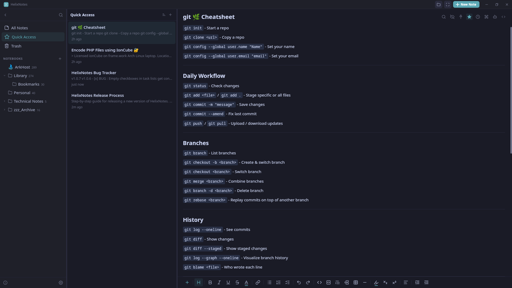
I built a note-taking app because the one I wanted didn’t exist. Clean UI, local .md files, no cloud, no account.
Built with Rust + Tauri 2.0 + SvelteKit. Full-text search powered by Tantivy. Graph view, AI writing tools (bring your own key), Obsidian import, version history.
Available for Linux (AppImage, APT, AUR), Windows, and macOS. Source: codeberg.org/ArkHost/HelixNotes
threaded - newest
Your website says “No sync. No lock-in. No bullshit”
Would you mind elaborating on the thought there? Why no sync?
I use obsidian with self hosted live sync, my notes are mine and they live on my hardware, but they are always in sync between my devices. If I’m on my desktop and take notes, I can pull them up on my laptop or even my phone. With this, I can’t reference my notes (or update them) until I’m back on my desktop.
The line “No sync. No lock-in. No bullshit” tells me you’re opposed to it on principal, meaning you don’t intend to ever add the ability to sync, and that’s a nonstarter for me and a lot of people I image. I’d love to migrate from obsidian to something open source, and I’d love to potentially spend time working on contributing a self hosted live sync like feature, but I need to know if my work and pull request will be immediately rejected on a principal I’m not sure I understand?
Good question. “No sync” means no built-in cloud sync - not that sync is impossible. Your notes are plain .md files in a folder, so you can sync them with Syncthing, Nextcloud, rsync, Git, or anything else you already use. The app watches the filesystem for external changes and picks them up automatically.
The philosophy is: I don’t decide where your files go. You do.
As for contributions - absolutely welcome. PRs won’t be rejected on principle. If you want to work on a self-hosted sync feature, open an issue on Codeberg and let’s discuss the approach first. I’d love to see it.
Sounds good, I’m trying out the app and seeing if I can really use it to replace obsidian, and I might dedicate some time to contribute if I end up using it. I agree with your assessment that obsidian’s customization with its plugin eco system leads to it becoming a side project that you have to baby instead of just a note taking app.
I don’t use a lot of plugins on obsidian, but I use rely on a few that make organizing notes easier, mainly:
On sync, two problems with using “whatever” to sync entire vault:
Great feedback.
If you end up trying it and want to contribute, open issues on Codeberg for what you’d like to see. Contributions are very welcome.
Oh, forgot to ask, are mobile apps on the roadmap?
Obviously your chosen tech stack makes that difficult, but notes on the go are pretty essential.
I’m thinking about the mobile app in terms of how already. But it’s definitely on the roadmap.
I just downloaded. Looks amazing. I will try it out. Do you have a Patreon Page or something?
Thanks! No Patreon yet, but I’ll set something up. For now, the best support is feedback and bug reports.
So far it has been smooth sailing. But I will report. Only things Iam missing are:
maybe you can consider these for the future.
Great! Thanks for the feedback.
All 3 enhancements noted. Will be implemented in next release.
Update: The line shortcuts and line numbers will be in the next release. The side-by-side/split view requires a significant architecture refactor, so that one will take longer - it’s on the roadmap but not for the immediate next release.
Wow, that was really fast. Thank you very much!
You can now open a note in a separate window. This has been added in v1.1.6, along with other fixes and feature additions.
What is about obsidian?
Is it possible to view files in the root of the vault?
Also, is it possible to show non
.mdfiles?My use case for the second question is that I have
.pdfand.xmlthat acompanies my notes. Having HelixEditor showing them as well (or opening them in system default editor) would be nice.Not ideal since you can’t easily sort by folder hierarchy but you can see your root files in All Notes.